The short answer
A semiconductor tool is qualified as a whole. Adding a sensor and a remote I/O point on a separate network answers the question without adding a single tag to the control program.
In this article
A semiconductor tool is qualified as a whole. The recipe, the timing, the interlocks and the code that runs them were proven together, and the fab bought exactly that. So when someone asks for more data off the tool, the first question is never "can we get it." It is "what do we have to touch to get it."

That question gets harder on the platform a lot of tool builders standardized on: PC-based control with an EtherCAT fieldbus. Inside its own environment it is fast, compact and easy to work with. Getting data out of it for anything the original design did not plan for is where machine builders and fabs tend to get stuck.
Why the data is hard to reach
EtherCAT is a closed, deterministic segment owned by one master. Nothing else gets to sit on it and listen. Every I/O point, every serial terminal and every drive on the tool reports to the controller, and the controller decides what leaves the machine.
So the data you want usually exists, but it lives inside the PLC project. The controller vendor's own data interfaces are real and they work well: add-on functions that publish controller variables over Modbus TCP or OPC UA to anything on the network. Each one, though, is a change to the control project. On a tool still on your floor that means engineering time and a regression test. On a tool already in a fab it means the customer's change control, and often a requalification nobody has budget for.
That is the lock-in people describe: not that the data is impossible to get, but that every path to it runs through the one piece of the tool nobody wants to reopen.
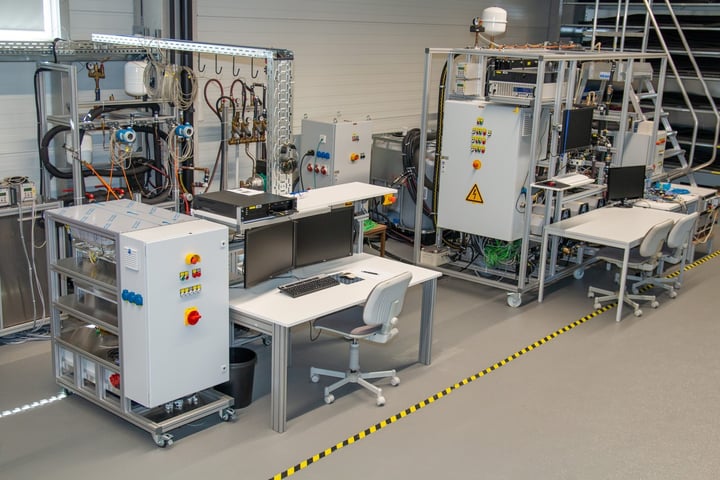
On the test bench, the capture path collects acceptance data and comes off before the tool ships.
When the data only lives inside the PLC
Some data only exists inside the control project: a recipe step, an axis position, an internal alarm state. For that, the controller's own data interface is the path. If you are the machine builder, the best time to add it is now, at design time, on its own network port, before the tool is qualified and before the first customer asks. It costs very little on the drawing and a great deal after shipment.
Everything else is fair game for a second network beside the controller, and that is where Brainboxes fits. Not sure which side your data sits on? Bring us the tool and we will work it through with you.
Five places a data layer beside the controller fits
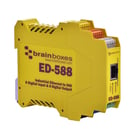 1. The signals already on the outside of the tool. Signal tower states, dry contacts for cycle complete or fault, auxiliary contacts on door interlocks and the EMO circuit. Brainboxes remote I/O reads those as digital inputs and presents them as Modbus TCP, which any facility system, MES, historian or short Python script can poll. The controller never knows it is being watched, and its code does not change.
2. Sensors the tool never had. Cooling water flow on a chamber, the run state of a vacuum pump, a lid or panel that someone keeps leaving open. Adding a sensor and a remote I/O point on a separate network answers the question without adding a single tag to the control program.
3. Serial devices the controller does not own. Chillers, heat exchangers, vacuum gauge controllers and abatement units often carry an RS-232 or RS-485 port that nothing is connected to. An Ethernet to serial device server puts that port on the network, and the PC on the other end sees an ordinary COM port, so existing software and test scripts keep working.
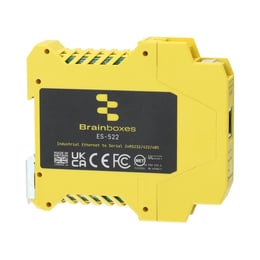 4. Build, test and burn-in. During assembly and final test, the data you need is acceptance data, and the capture path should not become part of the product. Remote I/O and a serial device server on the test bench collect it, then come off when the tool ships. The same hardware works for LabVIEW or MATLAB rigs that expect a COM port.
5. Ethernet inside your own subsystem. Sometimes the network belongs inside the product itself, between boards in a module you build. Brainboxes published that one as a case study: a wafer fab flow controller connecting five boards over a board-level Brainboxes switch, power cycled 113,000 times in testing. Read the Brainboxes case study
Potential use cases, device by device
These are the Brainboxes devices that fit the jobs above, and where each one could be used on a tool, a subsystem or the bench that tests it.
| Device | What it is | Where it could be used |
|---|---|---|
| ED-516 | 16 digital inputs | Signal tower states, cycle complete and fault contacts, door and interlock auxiliary contacts, read from the outside of the tool |
| ED-527 | 16 digital outputs | A beacon, status light or permissive on a separate test or monitoring layer |
| ED-588 | 8 digital inputs, 8 digital outputs | A small station: a few states read and a few indicators driven, one module per tool |
| ED-549 | 8 analog inputs, voltage or 4 to 20 mA | Signals the controller never had: cooling water flow, a pressure transducer added for monitoring, pump current |
| ED-560 | 4 analog outputs | Setpoints on a test bench or burn-in rack, driven from the bench PC rather than the tool |
| ED-582 | RTD temperature inputs | Chiller, heat exchanger and cabinet temperatures |
| ED-593 | Thermocouple inputs | Burn-in fixtures and hot zones on a test rack |
| ES-551 | Industrial Ethernet to serial, one or two isolated ports | The spare RS-232 or RS-485 port on a chiller, vacuum gauge controller or abatement unit, put on the network from inside the cabinet |
| ES-246 | Desk and rack Ethernet to serial | Bench instruments where LabVIEW, MATLAB or a test script expects a COM port |
| ES-279 | Desk and rack Ethernet to serial | Test racks with several serial instruments on one network drop |
| Industrial Ethernet switches | DIN rail, unmanaged | Keeping the monitoring network separate from the tool's control network in the same cabinet |
| PE-505 | Pure Embedded board-level switch | Ethernet between boards inside a module you build, as in point 5 above |
Each device name opens its Brainboxes product page with the full datasheet.
Which one fits depends on what the tool already exposes, and that is the first thing we ask.
Questions worth asking before you pick a path
- Does the data exist outside the controller (a contact, a sensor, a spare serial port), or only inside the PLC project?
- Who owns the control project once the tool ships, you or the fab, and what does a change cost on each side?
- Where does the data need to land: facility monitoring, your own service team, a test log, or the fab's host?
- Is this for every tool you ship, or a retrofit on tools already installed?
- Does the network for this data need to stay physically separate from the tool's control network?
After SEMICON West
Brainboxes exhibited at SEMICON West 2026 at the Moscone Center, booth 6648, October 13 to 15, and we were there with them all three days. Most of the conversations at the booth came down to the five questions above, and we wrote up what tool builders actually asked: What tool builders asked at SEMICON West 2026. Our semiconductor and test equipment page lays out the rest of the product lines we carry for tool builders, and the Brainboxes page has the full range.
At Dynamic we represent power, control and measurement lines for machine builders and panel shops in Northern California and Northern Nevada, and we are Brainboxes' rep across the territory. We help at the schematic and bill-of-materials stage, where a data path is cheapest to add.
Working through a live design question? Tell us what you are connecting and we will come back with a part list.